Showing posts with label gamification. Show all posts

Thursday, October 27, 2016

BYOT

For a few years now, our school has had a Bring Your Own Technology (BYOT) policy, which is located in each school’s handbook.  This promotes the use of a student’s individual device for educational purposes during school hours at the discretion of each teacher in their classroom.  Many teachers are taking advantage of this opportunity to use a tool that the student already owns.  If you aren’t or you are but are not sure about the steps to be taken, here’s a refresher:

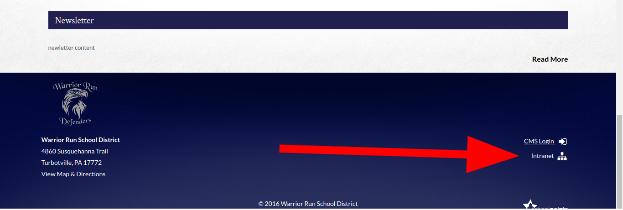
On the intranet, read your building’s student handbook with the guidelines.
Untitled drawing.jpg

Students should register their device with the district.
Untitled drawing (1).jpg

The form that they complete looks like this:


Once the students have completed this step, they are allowed to use their devices during school at the teacher’s discretion.  This can include using it for the class itself, as a supplementary material that the student is providing.  Here are some examples that teachers are already using this in the district:


Do you know of other ideas for using the BYOT agreement?  Send them my way!

Sunday, October 2, 2016

Putting Robots to work in the Classroom

There are several types of robots which have become popular in classrooms over the past few years.  They include Dash and Dot, Spheros and Ozobot.  Each of these has different benefits and your own creativity is the limit for how it might be used in your classroom, but here is some information on them and ideas for them to hopefully inspire you to try something new.


Robot
Pros
Cons
What you need
  • Has a toggle between “Drive” mode and “Programming” mode
  • Fun to drive
  • Virtually indestructible
  • Very easy to turn on and connect
  • App comes with challenge ideas
  • An “educator kit” comes with 12 spheros and chargers, measuring tape, protractors and stickers
  • “Programming” mode allows kids to try out coding on their own
  • Need accessories for more advanced usage, such as outdoors
  • Controls can be difficult for younger kids
  • Better for using on the floor
  1. Lightning Lab app (iOS/Android)
  2. Device with bluetooth to control it (iPad or other mobile device)
  3. Teacher Account and student accounts (if you want to save your students’ programs) on Lightning Lab
  4. To email Theresa and ask her to borrow them! :)
  • Great for younger kids
  • Two-parts allows for greater use
  • Teaches a simple type of coding, exposing kids to this growing STEM field
  • Speak and make sounds to accompany actions
  • Senses objects around them
  • Reacts to light and sound
  • Needs accessories for more advanced options
  • Pricier than other robots
  • Should be used on the floor preferably
  1. Mobile device with bluetooth
  2. One of the four apps to operate Dash and Dot (more info here).
  • Control with block-based programming and coding that is also color-coded
  • Play with multiple LED lights for different effects
  • Very small - only 1 cubic inch (good for table top play)
  • Charge and program with a computer
  • Follows lines and detects colors
  • Much cheaper than other robots
  • Smaller and more fragile
  • Must use the website to program it
  • Has a one-time upgrade fee of $9.99
  • Works best with the starter kit
  1. Ozoblockly website
  2. Computer with USB port for charging
  3. Set of markers for color detecting


The strength of these devices is in their ability to allow students to experience inquiry and project-based learning.  They can be used in a variety of ways, from being a pawn that moves through a review game, to an exercise in communication on the steps involved in a process.  Consider the concepts you are teaching this year and ask, “How could this be a tool in my classroom?”

Two middle school students program their Sphero to follow the line
Not every kid needs to learn to code.  Not every kid will work in STEM fields someday.  But every kid is inspired when you use 21st century technologies in their learning.  If you are interested in using the Spheros set of 12 that we already have in the library, please let me know and I would be happy to loan them to you or work with you on using them in the classroom.

Wednesday, August 31, 2016

Escape the Classroom

Did my title get your attention?  This blog post doesn’t have secrets to how to get paid without showing up to work everyday.  It’s inspired by escape rooms or breakout rooms, which have become really popular over the past few years as adult games or for leadership and team-building workshops.  Having started in Japan in 2007, it’s even made its way to Lewisburg - have you tried it out yet?

In a continuing effort to make kids fully active in their learning, some teachers and innovators have grabbed the idea for the classroom, creating small puzzles for students to solve that leads them to the clue for the next puzzle.  These are great for any level because you can adapt them for any theme, from zombie apocalypse to prison escape.  Still adjusting from their summer off, students can definitely relate to the idea of trying to escape our classes, but this time they will be watching the clock wishing for more time to solve the puzzle.

So how could you make it work?  William Chen of Escaperoomtips.com says there are 11 basic puzzle ideas that you can adapt:

Hidden Objects - There are objects hidden around the room in strategic or interesting locations. Perhaps they are under a block in the floor, attached to the chair in the room, or hidden under a desk. Perhaps there are hidden words written on the blinds (but only if you open them), or under / behind the paintings on the wall. Perhaps there's something written on the shirts that they make you wear at the start of the game. Perhaps if you pull a lever or move something a specific way, a special object will pop out.
The Four-Digit Combo Lock - Or any such variant. I've seen 5-letter word locks, directional locks, and regular key locks. A very easy way to lock something up until you discover the right combination, directional sequence, word, or key. However, this technique is a bit lazy and is best not overused.
The Blacklight Puzzle - Opening a container, drawer, or cabinet will reveal a blacklight, or various pieces of a blacklight. Once you have your full blacklight, you can shine it on the walls, on surfaces of objects, or on pieces of paper to reveal additional information that can help you solve your next puzzle.
Words with a Hidden Message - You have a long sequence of words (perhaps a long sentence, a poem, or a story), and you have to extract information from the words. Some examples include:
  1. Read or decode all of the letters colored peculiarly
  2. Read all of the large letters
  3. Certain words in the text refer to objects in the room, and provide an ordering that you can use to arrange or press the objects
  4. You have a sheet with rectangular holes in it, that you can use to cover the words. A specific message will appear telling you what you need to do.

The Magnetic Switch - You have to place a certain object in a certain place. This will trigger a magnetic switch that will give you access to the next room of the escape room. Knowing what to place where is usually a clever clue given somewhere in the room, or just the solution to a puzzle (e.g. place the object that is the solution to this puzzle in this location).
Going Fishing - There is an object out of reach, and you must fashion a makeshift grappling hook or creatively use an object to get access to the item. The item is usually something of obvious importance, like a set of keys or one of the items you need to escape the room.
Decoding a Cipher - The ciphers are rarely just simple alphabetic ciphers. Expect ciphers that include shapes, or colors, or animals. Each of those objects will map to a certain number, and after deciphering the meaning of the objects, you can input the code into a lock.

Depending on your subject area, your objectives could differ.  This is where some companies have decided to create standard “kits” that you can use to adapt to your content.  One company is BreakoutEDU and instead of breaking OUT of the classroom, you are breaking INTO the box.  They have also created a digital version, which might inspire a more advanced WebQuest (since this idea is very similar).

The digital versions are a great use of gamification in learning, but they do not encourage the same amount of teamwork, hands-on collaboration and activity as the physical versions.  One nice version, though, comes from the ASU School of Life Sciences, explaining how the scientific method works.  Try it out!

I have ordered a Breakout box so we can give this fun idea a try.  If you’re interested, get in touch with me!  If you want to know more about how and why this has a positive influence on student learning, check out this article from The Atlantic.

I hope you can find a way to make this work for you and try something new this year.  Have a great long weekend!