Showing posts with label 4cs. Show all posts

Tuesday, October 23, 2018

Choose Your Own Adventure

When students create their own Google Slides to demonstrate their learning, they are taking ownership over what they know and can do.  Allowing students to share some creativity will also enhance their connection to the content.  One way to do this is by having them create a Choose Your Own Adventure story in Google Slides.

When you create and share Google Slides, you can link certain slides to another slide.  That makes it possible to create a slideshow that will jump around in a specific order of your choosing.  See the example below.


When you are on a certain slide, that URL is unique and will link to that slide. Many students and teachers have used this to make interactive stories in Google slides based on other topics they have studied. See the examples below from around the web.

Treasure Hunt
The Secret Village
Butterfly Friends

Here are some other helpful resources for a project like this.

Planning Template
StoryboardThat

Wednesday, May 23, 2018

Edtech Certs

You already know we are hosting a Google Boot Camp this summer, but what you may not realize is that GoogleEDU is not the only edtech company that has certification programs to prove your skill with incorporating technology successfully into your classroom. Here is a list of great edtech certifications which make a useful option if you are still considering how to use your flex time.

Google Level 1 Certified Educator

Google Level 2 Certified Educator

Apple Teacher

Flipgrid Certified Educator

Common Sense Educator

National Geographic Certified Educator

Raspberry Pi Certified Educator

Schoology Champion

SMART Digital Educator

Not all of them are created equal. Some have tests and some have tasks. Some are free and some have an associated cost. Figure out what is best for your classroom and give it a try!

Friday, October 20, 2017

Learning Techniques and Tech Tools to Make Them Happen

Recently I was listening to the Cult of Pedagogy Podcast and heard about the research of some cognitive psychologists on learning strategies.  In it, they talk about six learning strategies that help us develop our study skills.  I thought I would share this with you and also include some tools for making that happen in a technology rich environment.

First off, you can read the actual article here.  In it, the learning strategies are:

  1. Spaced Practice
  2. Retrieval Practice
  3. Elaboration
  4. Interleaving
  5. Concrete Examples
  6. Dual Coding

Many of the learning strategies we were taught growing up fall into one of these categories.  I do not write this blog post to talk about flashcards, but rather how a chromebook or mobile device can be used in the same way.

Spaced Practice is the same as chunking, and teachers structure their lessons so that they are introducing a small amount of new information and reviewing old information already.  With the use of Google Calendar and turning on alerts, we can show students how to remind themselves to work on a larger project a little bit at a time, such as essay writing and revising.  There are also student planners for chromebooks, such as My Study Life and myHomework.  Just a reminder that anything requiring an account may have restrictions for students under the age of 13 without parental permission.

Retrieval practice forces us to put away anything that might trigger a memory that might make us feel that we know or understand a concept, but without the trigger, we cannot recall the information.  The learning experts suggest writing or telling all the information on the topic so that you can see how much you can recall.  Then through this, any misconceptions can be corrected or you can make note of areas in which you could not recall enough.  

Chromebooks can be used to do this in a number of ways, from recording sound files of students talking about their knowledge, then a teacher can listen and give feedback, to a student taking a video of themselves talking and following the same procedure.  Sound recordings and video recordings can both be made directly on the chromebook, then saved to Google Drive, linked in Google Classroom, or sent via email to the teacher.  For sound recordings, I recommend Mic Note and for video recordings I recommend Soapbox.

For the elementary iPad setting, Educreations and Evernote are great options for this, but iOS 11 now has screen recording available, so students could actually be just using the camera and recording themselves with the camera facing them as they talk.

Elaboration goes hand-in-hand with questioning techniques and good class discussion, where the students are posing, answering, and facilitating discussion.  While face-to-face would always be preferable, it is possible to use discussion boards to work on this skill asynchronously and also have students provide evidence to support their claims.  Google Classroom and Schoology both work very well for this.  At the high school level, having students work towards providing citations to their discussion posts will prepare them for the requirements of higher education coursework.

Interleaving is mixing the repetition of a variety of skills so that students are forced to decide on the correct strategy to give the answer.  This is where project-based learning really shines because it is already mixing a variety of strategies and skills.  Writing, problem-solving, communicating, working well with others, planning a timeline are all elements we see in our projects.  Depending on the task, technology is usually a great tool for these ideas that we are already implementing in a great number of ways.

Concrete examples is something that teachers always do, but by having students come up with an example to explain an abstract idea of their own, it is more likely to stay with them.  It can be done in a number of ways.  The hardest part is not just drawing from a handful of students, so having every student contribute their concrete example to a Google Form or a discussion board can force them to create their own version that will stick with them as they learn because it can be personalized to their interests.  Exit tickets, Frayer models, and parking lots are other ways of having each student create their own.

Dual coding is my favorite because I am a visual learner.  To draw from what the authors said, it’s just combining the knowledge with a visual format:

“And when we say visuals,” Smith explains, “we don’t necessarily mean anything
specific, so it depends on the types of materials. You could have an infographic, a cartoon strip, a diagram, a graphic organizer, timeline, anything that makes sense to you so long as you’re sort of depicting the information both in a way with words and a way with pictures.”

“This isn’t just for students who are good at drawing,” Weinstein adds. “It’s not about the
quality of the drawing. It really just needs to be a visual representation as you can depict it.”

Another favorite for me is sketchnoting, and if you like Sylvia Duckworth, you know how effective mind mapping can be.  This is really powerful for students who like to doodle.  They will often come up with sketches so great that they are worth sharing with their classmates.

While this blog post has been long, I hope it has given you a variety of resources and ideas.  Please reach out if you have any questions and be sure to check out the websites of the Learning Scientists and Cult of Pedagogy.


Wednesday, September 27, 2017

Empowering students

I spent the day with some other WR staff members at the MCL Summit in State College, PA.  As I listened to students and teachers and administrators from other schools talk about what they are doing and how, I thought about the small ways that we are already empowering our students.  Here are some of the great instructional practices that already exist at Warrior Run.


Having students work toward the standard but letting them decide the product.  While students might need to work on their writing skills, they are allowed to do so in different forms, from researching a passion project to blogging about a favorite hobby.  Being engrossed in the topic allows them to feel that there is a purpose to the activity beyond school.  When students make connections to the real world, they stop asking “why do I need to know this?”


Encouraging discussion and debate.  In the information age and an era of fake news, students have to be mediators of their digital diet.  Being able to distinguish fact from opinion and research from rhetoric will help them refine their synthesis skills in order to venture through the current media and political landscape.  As teens struggle to find themselves and define who they are, this can look like challenging a teacher.  While respect is necessary, sometimes students are more of an expert on certain topics, especially as the internet makes it possible to develop skills outside a traditional setting.


Transforming the classroom.  While a teacher with a board at the front of the room with students in rows is the traditional understanding of a classroom, research suggests that today’s learners, who are constantly connected to the world through their phones, need a wide variety of instructional strategies.  Direct instruction has its place, but so do collaborative groups, independent work stations, and other types of blended learning.  In order to optimize these strategies, sometimes a classroom transformation is necessary.  Elementary teachers are the experts of maximizing the classroom space, with different areas of the class for different tasks.  As students grow, the most important aspect is flexibility.  I was recently inspired by a number of ideas (see this, this, and this), but I really enjoyed this website for planning the layout.


Encourage risk-taking and failed attempts.  Just in the same way that parents or teachers model a love of reading to children by demonstrating that they read for their own enjoyment, teachers can model a growth mindset by sharing their stories of risk-taking and failure with their students.  Life is messy and students who realize it won’t be perfect and instead develop resiliency will be more likely to try difficult tasks and succeed.  Knowing that a teacher will be there for them when their plans don’t work out creates the necessary self-esteem (and safety net) to be willing to work through complex tasks.  My favorite example that a teacher created was an #epicfail wall where students shared their funny attempts that failed.


Creating time for reflection.  One of the most important parts of the learning process is reflection.  The feedback supplied by a teacher is so much more meaningful when internalized by a student.  Think of those moments when you couldn’t stop dwelling on an event - it stuck with you, right?  You won’t forget what you learned from that experience.  Allowing an opportunity to review the feedback and discuss it with the teacher will encourage students to reflect, but so will modeling.  A teacher can share how they reflect by talking aloud about their thinking.  When our kids make a mistake, like trying to open their yogurt upside down, my husband will ask, “What did you learn?”  While he’s doing it to lighten the mood and make the kids laugh, they instantly reflect on what went wrong.  Do they learn?  Sometimes.


Many of these ideas are not new to this generation, they are just meaningful experiences that we know develop our students into well-rounded adults.  As you reflect on how to incorporate them into your class, take pride in the fact that I was inspired by seeing the work of Warrior Run teachers.

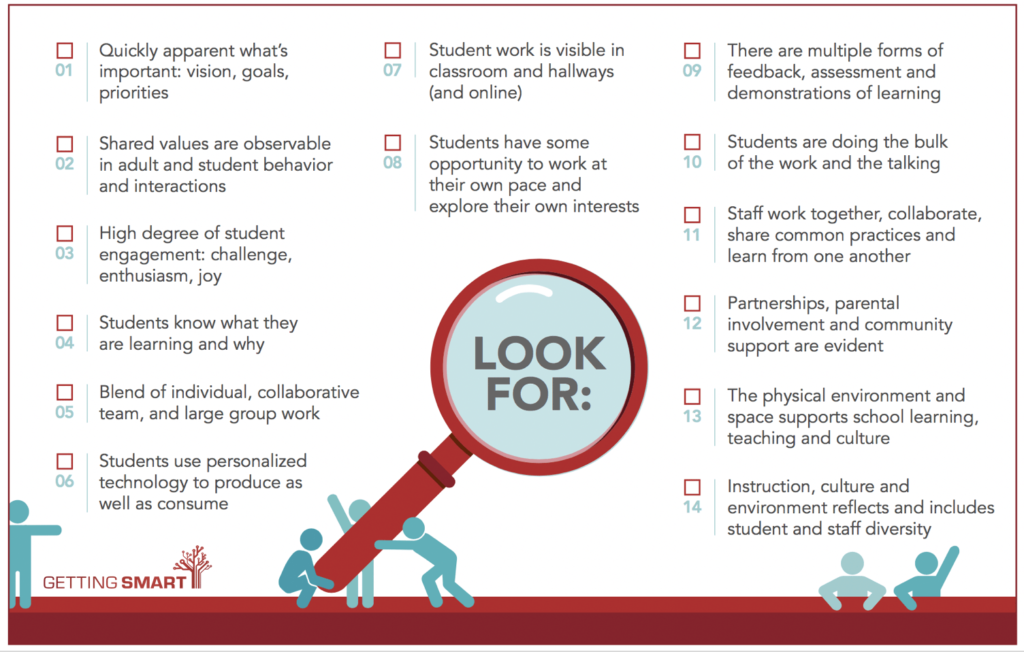
Image from a Getting Smart article on Student-centered learning