Showing posts with label 21st century. Show all posts

Friday, February 15, 2019

Critical thinking

When searching for a definition of critical thinking that would apply well to a classroom setting and the instructional design of a teacher, I was discovering that the meaning of this term is as diverse as the students in the classroom.  My favorite definition so far is over-simplified - "thinking to produce judgment" - clear, concise, to the point.  But the skill itself is at the highest levels of Webb's DOK - analyzing, synthesizing, supporting a claim.

Image result for webb's dok


Since learning is largely social, one of the best ways to get students to think critically about the judgments that they are making is to hear the alternative judgments that others are making and support the viewpoint with evidence.  Some great discussion techniques for the classroom include:


Sometimes students who are not normally active participants in the in-class discussion can feel more successful with an online discussion, such as in Google Classroom.  Another website I ran across recently which allows students to participate in a discussion, make a claim and support it is Kialo.  According to Common Sense Education's review of the site, "It's a good platform to teach the importance of reasoned, respectful arguments when trying to persuade others."  It can be used to participate in public or private discussions through the teacher platform.  As we help students learn how to build an argument, it can also serve as ideas for good questions to get the students motivated to discuss.  

Students are participating in discussions online through social media, so hopefully as teachers we can use a site like this to guide them to be better 21st century digital citizens.


Wednesday, April 25, 2018

Best Add-Ons for Google Forms

Many of us are using Google Forms to create quizzes, send surveys, gather input, and collect data. With the use of add-ons, you can extend the use of forms and make it work harder for you. Here are some useful add-ons and how you might use them.

QR Code Maker - Do you want your students to fill out a form but you don’t have a quick way to send them the link? You can use QR code maker to have it create a link to the form that they can scan with an iPad or chromebook and it will open the form directly on the page. You could use this to hang the survey in a location for parents or students, put it on an assignment page or parent information sheet that is sent home to gather contact info, or put it on your website.

Form Limiter - This add-on allows you to turn off a form from accepting responses. You can choose the condition that stops it from collecting responses to be after a certain date or after it has received so many submissions. It can be used to accept data until a week after the initial request for example, or when the first 10 spots are taken.

Choice Eliminator - if you have a form with multiple choice, checkbox, or list question, this option will eliminate that as an option once someone else selects it. For example, you have a list of possible project topics that students A, B and C need to choose. If students A and B choose their topics, student C will only see the remaining options and be able to choose from those. Other ways to use this are to choose meeting dates and times, tasks for completion, or sign-ups for events.

With these add-ons, Google forms can be used beyond just giving a survey. If you need help getting started or troubleshooting an issue, please reach out!


Wednesday, February 21, 2018

Classroom Screen for Classroom Management

Do you use your smartboard to show a variety of tools as part of a lesson?  For example, giving students a timer and indicating the countdown for how long they have to complete the task?  Or maybe you want to do a random name choice to choose a volunteer.  Maybe you keep a traffic light in your room to indicate appropriate volume level while working.

Classroom screen has combined these all into one place and made a toolbar to quickly bring up these options.  When you have this page open in chrome, your page will look like this:

The menu at the bottom allows you to add different options on the screen.  They are:


  • Language - change to another language such as Spanish or French!
  • Random name - import your class list and choose a random volunteer
  • Sound level - allow it access to your computer microphone and it will show when the volume is getting too loud
  • QR code - tell it a web address and the kids can scan the code on the screen to go to a certain website (K and 1, this is GREAT!)
  • Drawing - draw function, similar to the smartboard tools
  • Text - same idea
  • Work symbols - another volume management, but with the options for "Silence", "Whisper", "Ask a neighbor" and "Work together"
  • Traffic light - volume control
  • Timer - Start a countdown and tell those kids how much time they have to do a task / break out / etc
  • Clock - give the time (analog and digital)
This has great possibilities to help manage class flow.  Check it out and let me know what you think!


Wednesday, January 31, 2018

Online Portfolios at all levels

Many classes use portfolios to collect evidence of student learning. This can take a few different forms:
  • Evidence of successful completion of a task 
  • Journaling on a project, such as what they learned while going through a process 
  • Reflection on their learning 
  • Pictures or videos that demonstrate understanding or implementation 
When creating a portfolio, teachers may indicate what evidence needs to go in the folder. However, it is also useful to have students choose the best elements to represent their learning. In order to best represent all concepts, a teacher may still guide the necessary components.

Student portfolios can be compiled online in a number of ways. The easiest way in a Google school is with a Google folder. For those of you using Hapara, it seems even easier when you use the Hapara folder created for each student, but just remember that these will be archived at the end of the year! Anyway, here are some alternate ways (not Google Drive) at each level to compile an online student portfolio:


As the state rolls out the Future Ready Index, there will continue to be more and more discussion about evidence of student learning.  This will allow us to focus on deeper levels of learning and what we know to be meaningful.  I hope these tools provide you with a starting point to try a new tool related to this topic.


Monday, November 6, 2017

Focus

As a parent of two who recently put passcodes on her children’s iPads, I am aware of the pull that technology offers to children.  As a person who has tried to put most of the content I need on a day-to-day basis on my phone so it’s always accessible, I understand how for some of us the device has become a constant distraction.


With that in mind, I offer some ways to gain, keep, or re-focus, whether you are trying to do this with your students or for yourself. This means using a device AND staying on task!


For students, secondary teachers can make use of Hapara to focus a student’s browsing by only allowing them to visit certain sites for a determined period of time.  Teachers using iPads can turn on guided access to limit the areas on the screen with which students can interact.  Having your students use their computers with their backs to you (and their screens facing you) can also help to make sure they are on task.  Ultimately, though, it’s acceptable and healthy to put away the devices and have a face-to-face conversation.


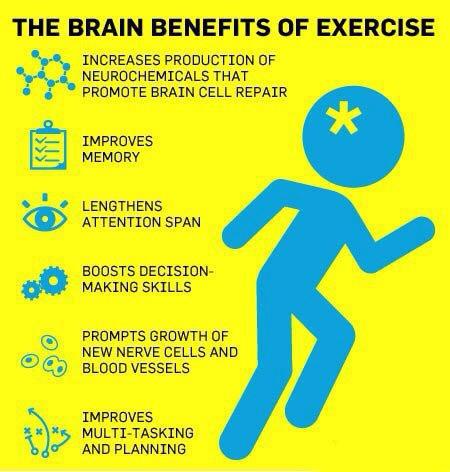
For teachers, there are several apps that will remind you to take a brain break: StandApp, Stand Up!, and Move It.  If you and your students are spending all period sitting at your desk, working on research, a presentation, or otherwise focusing on a task, it will be beneficial to you to get up and move, even if only for a stretch.  A Stanford study finds that walking is good for creativity, so it may be a good idea to work this into the lesson.  


Another aspect related to this are desk styles.  We have traditional table and chair, but now there are standing desks, fidget bands, yoga balls, node chairs, and the list goes on.  As someone who works with Greg, I can definitely see how these might be helpful!  :)

Friday, October 20, 2017

Learning Techniques and Tech Tools to Make Them Happen

Recently I was listening to the Cult of Pedagogy Podcast and heard about the research of some cognitive psychologists on learning strategies.  In it, they talk about six learning strategies that help us develop our study skills.  I thought I would share this with you and also include some tools for making that happen in a technology rich environment.

First off, you can read the actual article here.  In it, the learning strategies are:

  1. Spaced Practice
  2. Retrieval Practice
  3. Elaboration
  4. Interleaving
  5. Concrete Examples
  6. Dual Coding

Many of the learning strategies we were taught growing up fall into one of these categories.  I do not write this blog post to talk about flashcards, but rather how a chromebook or mobile device can be used in the same way.

Spaced Practice is the same as chunking, and teachers structure their lessons so that they are introducing a small amount of new information and reviewing old information already.  With the use of Google Calendar and turning on alerts, we can show students how to remind themselves to work on a larger project a little bit at a time, such as essay writing and revising.  There are also student planners for chromebooks, such as My Study Life and myHomework.  Just a reminder that anything requiring an account may have restrictions for students under the age of 13 without parental permission.

Retrieval practice forces us to put away anything that might trigger a memory that might make us feel that we know or understand a concept, but without the trigger, we cannot recall the information.  The learning experts suggest writing or telling all the information on the topic so that you can see how much you can recall.  Then through this, any misconceptions can be corrected or you can make note of areas in which you could not recall enough.  

Chromebooks can be used to do this in a number of ways, from recording sound files of students talking about their knowledge, then a teacher can listen and give feedback, to a student taking a video of themselves talking and following the same procedure.  Sound recordings and video recordings can both be made directly on the chromebook, then saved to Google Drive, linked in Google Classroom, or sent via email to the teacher.  For sound recordings, I recommend Mic Note and for video recordings I recommend Soapbox.

For the elementary iPad setting, Educreations and Evernote are great options for this, but iOS 11 now has screen recording available, so students could actually be just using the camera and recording themselves with the camera facing them as they talk.

Elaboration goes hand-in-hand with questioning techniques and good class discussion, where the students are posing, answering, and facilitating discussion.  While face-to-face would always be preferable, it is possible to use discussion boards to work on this skill asynchronously and also have students provide evidence to support their claims.  Google Classroom and Schoology both work very well for this.  At the high school level, having students work towards providing citations to their discussion posts will prepare them for the requirements of higher education coursework.

Interleaving is mixing the repetition of a variety of skills so that students are forced to decide on the correct strategy to give the answer.  This is where project-based learning really shines because it is already mixing a variety of strategies and skills.  Writing, problem-solving, communicating, working well with others, planning a timeline are all elements we see in our projects.  Depending on the task, technology is usually a great tool for these ideas that we are already implementing in a great number of ways.

Concrete examples is something that teachers always do, but by having students come up with an example to explain an abstract idea of their own, it is more likely to stay with them.  It can be done in a number of ways.  The hardest part is not just drawing from a handful of students, so having every student contribute their concrete example to a Google Form or a discussion board can force them to create their own version that will stick with them as they learn because it can be personalized to their interests.  Exit tickets, Frayer models, and parking lots are other ways of having each student create their own.

Dual coding is my favorite because I am a visual learner.  To draw from what the authors said, it’s just combining the knowledge with a visual format:

“And when we say visuals,” Smith explains, “we don’t necessarily mean anything
specific, so it depends on the types of materials. You could have an infographic, a cartoon strip, a diagram, a graphic organizer, timeline, anything that makes sense to you so long as you’re sort of depicting the information both in a way with words and a way with pictures.”

“This isn’t just for students who are good at drawing,” Weinstein adds. “It’s not about the
quality of the drawing. It really just needs to be a visual representation as you can depict it.”

Another favorite for me is sketchnoting, and if you like Sylvia Duckworth, you know how effective mind mapping can be.  This is really powerful for students who like to doodle.  They will often come up with sketches so great that they are worth sharing with their classmates.

While this blog post has been long, I hope it has given you a variety of resources and ideas.  Please reach out if you have any questions and be sure to check out the websites of the Learning Scientists and Cult of Pedagogy.


Wednesday, September 27, 2017

Empowering students

I spent the day with some other WR staff members at the MCL Summit in State College, PA.  As I listened to students and teachers and administrators from other schools talk about what they are doing and how, I thought about the small ways that we are already empowering our students.  Here are some of the great instructional practices that already exist at Warrior Run.


Having students work toward the standard but letting them decide the product.  While students might need to work on their writing skills, they are allowed to do so in different forms, from researching a passion project to blogging about a favorite hobby.  Being engrossed in the topic allows them to feel that there is a purpose to the activity beyond school.  When students make connections to the real world, they stop asking “why do I need to know this?”


Encouraging discussion and debate.  In the information age and an era of fake news, students have to be mediators of their digital diet.  Being able to distinguish fact from opinion and research from rhetoric will help them refine their synthesis skills in order to venture through the current media and political landscape.  As teens struggle to find themselves and define who they are, this can look like challenging a teacher.  While respect is necessary, sometimes students are more of an expert on certain topics, especially as the internet makes it possible to develop skills outside a traditional setting.


Transforming the classroom.  While a teacher with a board at the front of the room with students in rows is the traditional understanding of a classroom, research suggests that today’s learners, who are constantly connected to the world through their phones, need a wide variety of instructional strategies.  Direct instruction has its place, but so do collaborative groups, independent work stations, and other types of blended learning.  In order to optimize these strategies, sometimes a classroom transformation is necessary.  Elementary teachers are the experts of maximizing the classroom space, with different areas of the class for different tasks.  As students grow, the most important aspect is flexibility.  I was recently inspired by a number of ideas (see this, this, and this), but I really enjoyed this website for planning the layout.


Encourage risk-taking and failed attempts.  Just in the same way that parents or teachers model a love of reading to children by demonstrating that they read for their own enjoyment, teachers can model a growth mindset by sharing their stories of risk-taking and failure with their students.  Life is messy and students who realize it won’t be perfect and instead develop resiliency will be more likely to try difficult tasks and succeed.  Knowing that a teacher will be there for them when their plans don’t work out creates the necessary self-esteem (and safety net) to be willing to work through complex tasks.  My favorite example that a teacher created was an #epicfail wall where students shared their funny attempts that failed.


Creating time for reflection.  One of the most important parts of the learning process is reflection.  The feedback supplied by a teacher is so much more meaningful when internalized by a student.  Think of those moments when you couldn’t stop dwelling on an event - it stuck with you, right?  You won’t forget what you learned from that experience.  Allowing an opportunity to review the feedback and discuss it with the teacher will encourage students to reflect, but so will modeling.  A teacher can share how they reflect by talking aloud about their thinking.  When our kids make a mistake, like trying to open their yogurt upside down, my husband will ask, “What did you learn?”  While he’s doing it to lighten the mood and make the kids laugh, they instantly reflect on what went wrong.  Do they learn?  Sometimes.


Many of these ideas are not new to this generation, they are just meaningful experiences that we know develop our students into well-rounded adults.  As you reflect on how to incorporate them into your class, take pride in the fact that I was inspired by seeing the work of Warrior Run teachers.


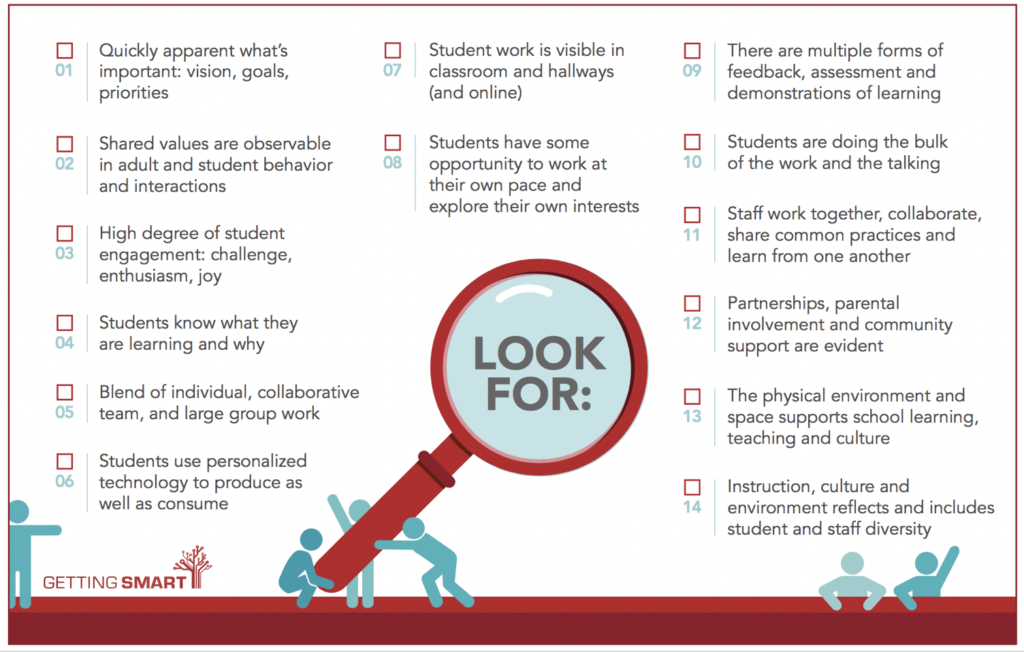
Image from a Getting Smart article on Student-centered learning